
FAQs for the Fundraising Widget
- Does my nonprofit need to have a PayPal account in order to create a fundraising widget?
- Why do I need to provide my organization's PayPal email address and Employer Identification Number (EIN)?
- I just created my widget on MySpace. The widget message states that the widget is pending confirmation. What does that mean?
- The authoring tool states that the widget has been declined. What does this mean?
- When I click the Create button, all I see is a blank page.
- How do I add my image to the fundraising widget?
- I am having trouble loading an image that resides on a hosting site such as Photobucket, Flickr, and Picasa
- Do I have to specify a financial goal?
- When I get a donation, I don't see the donor's name in the scrolling bar.
- How will the group I'm supporting get the donations made through my widget and copies of my widget?
- When I update my widget, will the copies of my widget also get updated?
- What happens when I don't want others to add the widget to their site?
- What currencies are supported?
- Which fundraisers are displayed in this link?
- Instead of displaying an image, "Image is not available" is displayed. How do I fix this?
- How do I publish my widget off of MySpace onto my web site or other web pages?
- Where is the HTML code on my clipboard?
- When do I need to update the widget?
- Does the fundraising widget work off of MySpace?
- What happens when I delete a widget?
- When a widget is copied and a donor contributes through the copied widget, to which PayPal account are the funds deposited?
Q: Does my nonprofit need to have a PayPal account in order to create a fundraising widget?
A: Yes. A PayPal account is required to deposit the widget donations. Your PayPal account should be set up as a Business account, with a "nonprofit" business type.
Q: Why do I need to provide my organization's PayPal email address and Employer Identification Number (EIN)?
A: When you create your fundraising widget, this information that you provide is used to verify that your organization is a nonprofit and to confirm that your PayPal account is correctly set up. Once PayPal confirms this, your widget will be approved and you can begin collecting donations.
Q: I just created my widget on MySpace. The widget message states that the widget is pending confirmation. What does that mean?
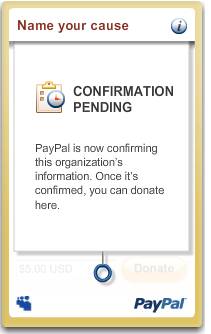
A: Your widget is in pending state while PayPal confirms that your organization's PayPal account is properly set up. If more information is needed by PayPal, we will contact you.
Q: The authoring tool states that the widget has been declined. What does this mean?
A: Widgets are declined if PayPal is unable to confirm that the account requesting the widget is a nonprofit organization. Contact compliance@paypal.com to obtain additional details.
Q: When I click the Create button, all I see is a blank page.
A: This problem occurs when the latest version of Flash is not installed. Please go to the Adobe site to see if you have the latest Flash installed on your browser: http://www.adobe.com/shockwave/welcome/.
Q: How do I add my image to the fundraising widget?
A: PayPal does not host photos for the widget, so you will need to provide the URL to where your image resides (for example, Photobucket, Flickr, and your own web server). Paste the URL into the "Widget cover image" textbox and then click the Load button. Your URL may not include any spaces. If you store your photos on an image-hosting site such as Photobucket and Flickr, make sure that the URL you are using passes back just your image and not a webpage. To get the URL for just the image, you might need to do the following:
- Go to the webpage that contains your image.
- Right-Click on the image.
- If you are using Firefox, select "Copy Image Location." This will give you the actual URL to use for your image on the widget.
- If you are using Internet Explorer, select "Properties." In the "Address URL" field, the value contains the actual URL to use for your image on the widget.
For best results, please optimize your linked image to be 170 pixels wide by 100 pixels tall.
A: Please ensure that the URL you are using passes back just your image and not a webpage for the hosting site. To get the URL for just the image, you might need to do the following:
- Go to the webpage that contains your image.
- Right-Click on the image
- If you are using Firefox, select "Copy Image Location." This will give you the actual URL to use for your image on the widget.
If you are using Internet Explorer, select "Properties." In the "Address URL" field, the value contains the actual URL to use for your image on the widget.
Q: Do I have to specify a financial goal?
A: No. If you do not specify a goal, the goal meter will be displayed at the 50% level. Also, the total amount collected will always appear in the goal meter.
Q: When I get a donation, I don't see the donor's name in the scrolling bar.
A:The scrolling bar does not display the names of donors. It displays the names of fundraisers who have copied your widget.
A: Donations made through any widget, including copies of your widget, will be deposited to the PayPal account of the organization that originally created the widget.
Q: When I update my widget, will the copies of my widget also get updated?
A: Yes. For example, when you replace the widget image, the new image will appear on the copies as well.
Q: What happens when I don't want others to add the widget to their site?
A: By default, the widget allows anyone online to copy your widget onto their web page. If you disallow others from copying the widget, then the Add to profile link, Fundraiser link, and fundraiser ticker on the widget are not displayed.
If you had previously allowed friends to copy your widget and later decide to disallow others from copying the widget, the existing copies will remain visible and will also hide the Add to Profile and Fundraiser links, and the fundraiser ticker.
Q: What currencies are supported?
A: Eighteen currencies are supported:
- Canadian Dollars
- Euros
- Pounds Sterling
- U.S. Dollars
- Yen
- Australian Dollars
- New Zealand Dollars
- Swiss Francs
- Hong Kong Dollars
- Singapore Dollars
- Swedish Kronor
- Danish Kroner
- Polish Zloty
- Norwegian Kroner
- Hungarian Forint
- Czech Koruna
- Israeli Shekels
- Mexican Pesos
When creating your widget, you will need to specify a currency for your widget in "Goal and Progress", which cannot be changed once selected.
Q: How do I display fundraisers for my cause?
A: Your widget displays fundraisers in three ways:
- Most money raised – the sum of donations from an individual widget. This amount is calculated as the amount of donations that are initiated from a widget. Donations received from children and grandchildren widgets are not included.
- Most influential – the sum of donations from an individual widget and its network of widgets, including children and grandchildren widgets.
- Most sites added – the number of widget that originates directly from your widget, which become children.
Q: I loaded an image, but I'm seeing "Image is not available" is displayed. How do I fix this?
A: Change the widget image link to point to the URL of your hosted image (i.e., Flickr or Photobucket). If you used to see an image in the widget and no longer see it, check to make sure you provided the correct URL.
Q: How do I copy a widget to a non-MySpace page?
A: When you click "Add to profile", you will be asked to log into MySpace (if not already logged in). After you are logged in, you will be prompted to copy the widget. You may also copy the HTML to pages on or off of MySpace.
Q: Where is the HTML code on my clipboard?
A: Your clipboard is a virtual area where you can store content that you want to copy. When you choose to copy a widget, we automatically put the HTML code into your clipboard. To paste these contents of your clipboard, press Ctrl+V if you are using Windows, or Command+V if you are using a Mac.
Q: When do I need to update the widget?
A: You can update your widget in "Step 2 - Post your widget online" when you are ready to have your modifications (for example, new widget cover image, new contribution amounts) reflected on your published widget.
If you want to continue editing the widget at a later time, your changes will be saved automatically.
Q: Does the fundraising widget work off of MySpace?
A: Yes, the widget may be used off of MySpace on blogs, emails and personal web pages. In order to copy a widget from MySpace, you need to log in to MySpace first. You will then be provided with HTML that can be copied to MySpace pages and off of MySpace.
Q: What happens when I delete a widget?
A: When you delete your widget, you are deleting all copies of your widget, including children and grandchildren copies. Once you delete your widget, you cannot undo the deletion. Upon deletion, a "closed sign" appears on the widget and all widget copies, and donations are no longer accepted through the widget.
When you remove the widget HTML from your blog or website, you are only removing the widget from being displayed. You have not deleted the widget. Copies of your widget will remain in existence until you delete the widget.
Q: When a widget is copied and a donor contributes through the copied widget, to which PayPal account are the funds deposited?
A: The funds are deposited to the PayPal account that created the original widget. Friends who copy the widget will not receive the funds.